
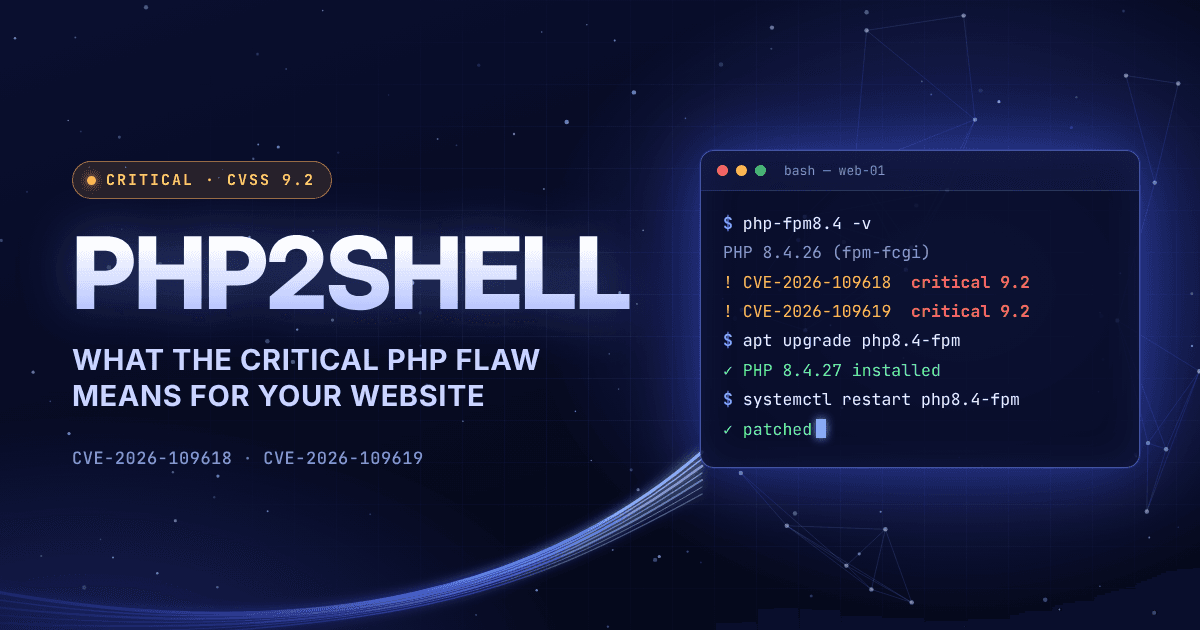
At a glance
PHP2Shell is the name for two critical security holes in PHP itself (CVE-2026-109618 and CVE-2026-109619), patched on October 21, 2026. In the worst case, a single crafted request lets an attacker take over a web server: no login, no click, no help from anyone inside.
- Who is affected: practically every website running on PHP 5.4 or newer. That includes WordPress, WooCommerce, Shopware, Magento, Joomla, Drupal, Laravel apps and custom code.
- Is it being attacked? Attack attempts started before the patch was even out, and several security firms now report widespread exploitation attempts.
- The fix: update PHP to 8.5.12, 8.4.27, 8.3.36 or 8.2.35 (or your Linux vendor's patched package), then restart PHP. Updating WordPress or plugins does not help.
- What to do today: ask your host or developer whether your server is patched, and get a clear yes.
Status: evening of October 21, 2026. This is a fast-moving story.
Why this matters right now
On October 21, 2026, the PHP project shipped emergency updates that every website owner should know about. PHP runs a huge share of the web: Wiz, one of the research teams behind the discovery, puts it at around 70% of all websites. That includes WordPress and popular shop systems such as WooCommerce, Shopware and Magento.
What makes PHP2Shell unusual is where the problem sits. It is not a buggy plugin or a weak password. It is in the engine that runs your website. A site can be well built and fully up to date on the application side and still be exposed. Security researcher Kevin Beaumont called it "one of the biggest vulns in years".
This article explains what happened in plain language, how to find out whether you are affected, and what to do, whether you run the server yourself or rely on a host or agency.
What is PHP2Shell?
PHP2Shell is the nickname for two vulnerabilities in the PHP runtime, both rated 9.2 out of 10 (critical) by the PHP security team. The name comes from an exploit tool that chains them together to get a "shell", meaning command access, on the server.
Both bugs come down to how PHP cleans up when a request crashes, especially when it runs out of memory:
- CVE-2026-109618, code execution via out-of-memory corruption. An attacker can make PHP run out of memory at a precise moment while it is still setting up a request. The cleanup that follows then treats half-built internal data as valid.
- CVE-2026-109619, code execution via stale state. Data from a crashed request can survive after its memory has been freed. A later request handled by the same PHP worker can then pick up that leftover state, which the attacker has prepared.
In simple terms: the attacker deliberately crashes one request so it leaves a trap behind, then sends a follow-up request that walks into it. With careful preparation, that is enough to run their own code on your server.
There is a second impact that gets less attention. The researchers also showed that attackers can read chunks of the server's working memory without taking over the server at all. That memory can hold passwords, login tokens, API keys and certificates from other visitors' requests or from the server itself.
Why this one is different
Most PHP security alerts concern one plugin, extension or setting. PHP2Shell is broader, for four reasons:
- It sits below your application. The flaws are in PHP's core. Wiz showed that even a bare "Hello World" page on a vulnerable PHP version can be attacked, so good code on your side does not protect you.
- No login is needed. The attack works without an account, a password or a click from anyone. It can fire before your application code even starts.
- It reaches back a decade. Every PHP version released in the last ten years is affected by at least one of the bugs, going back to PHP 5.4.
- It is proven on real platforms. Researchers achieved full takeovers of standard WordPress, Drupal and Joomla installations. E-commerce security firm Sansec confirmed attacks against Magento 2.4.9 and ten other PHP applications, and warns that Shopware and WooCommerce shops are exposed even when their own code is clean.
The risk is highest on servers that run PHP as an Apache module (mod_php), where a single unauthenticated request can trigger the attack. PHP-FPM setups, common with nginx and many managed hosts, behave differently and the confirmed attack paths there are narrower. PHP's advisory still lists them as at risk, along with php-cgi, FrankenPHP and LiteSpeed.
How it unfolded
The bugs were found in August with the help of AI, and the fix was meant to go public on October 22. A leak pulled everything forward by a day. All times in UTC:
- Aug 11, 2026: Calif and OpenAI independently report the out-of-memory bug as a route to remote code execution.
- Aug 19–24, 2026: Wiz Research finds more variants, confirms takeovers of Drupal and WordPress, and reports them to PHP.
- Oct 20, ~15:20: A Hacker News post reveals that two critical PHP flaws are about to be disclosed.
- Oct 20, 19:33: PHP announces an emergency release for the next day, 14:00 UTC.
- Oct 20, ~20:00: Calif accidentally posts a video of its working exploit, which speeds up copycat efforts.
- Oct 21, 03:02: Cloudflare switches on firewall protection for all customers, including free plans.
- Oct 21, 07:41: Chainguard publishes patched images early, so anyone can study the fix before the official release.
- Oct 21, ~14:00: PHP 8.5.12, 8.4.27, 8.3.36 and 8.2.35 are released.
- Oct 21, 14:19: watchTowr reports active exploitation attempts against both flaws.
Several organisations did not wait for the patch. In the Netherlands, DigiD, MijnOverheid, the lower house's website, the national cyber security centre and several education systems went offline as a precaution, The Hacker News reports. HR software provider BambooHR took its service offline in the US, Canada and Ireland. The UK's NCSC advised taking offline any system that cannot be fixed right away.
At the time of writing, no successful break-in has been publicly confirmed. But attack attempts are widespread. As SecurityWeek reports, Hadrian sees exploitation at scale, mostly through PHP's session upload-progress feature, and watchTowr says it does not expect the attackers' lack of success to last long.
Is your website affected?
If your website or shop runs on PHP and the server has not received the October 21 update, assume yes.
- PHP 8.5: vulnerable below 8.5.12. Update to 8.5.12.
- PHP 8.4: vulnerable below 8.4.27. Update to 8.4.27.
- PHP 8.3: vulnerable below 8.3.36. Update to 8.3.36.
- PHP 8.2: vulnerable below 8.2.35. Update to 8.2.35, then plan the next upgrade: 8.2 support ends on December 31, 2026.
- PHP 8.1, 8.0, 7.x and 5.x: vulnerable, with no official update. Options are a backported fix from your Linux distribution or support vendor, PHP's source patches (7.4 to 8.1), or an upgrade to a supported version.
Three things trip people up:
- Updating WordPress, Shopware or your plugins does not fix this. PHP is a layer below. The fix comes from your server, your host or your container image.
- The version number can mislead. Linux distributions such as Ubuntu and Debian patch PHP without changing its main version number. A server reporting "8.3.6" can be safe, while one reporting a newer number can still be vulnerable. Only the vendor's security notice or package changelog tells you for sure.
- Installed is not the same as running. After the update, PHP-FPM or Apache must be restarted. Until then, the old, vulnerable processes keep serving your visitors.
What to do today if you own a website
You don't need to be technical to handle this. You need clear answers from whoever runs your server.
- Find out who is responsible for your server. That might be your hosting provider, your agency, a freelancer or an in-house IT team. On shared or managed hosting, the host usually updates PHP for you, but confirm it.
- Ask three questions, in writing: Which PHP version does our website run on? Is it patched against CVE-2026-109618 and CVE-2026-109619? Have the PHP processes been restarted since the update?
- Check the version yourself if you can. In WordPress, go to Tools → Site Health → Info → Server. Most hosting panels show it too. On many Linux servers the number alone doesn't prove the patch is in, so still ask.
- If you're on PHP 8.1 or older, act now. There is no official update. Ask for a patched vendor build or an upgrade. If neither is possible today, take the site offline or put it behind a web application firewall until it's fixed.
- Use Cloudflare if you already have it. Cloudflare has switched on protection rules for all plans, including free ones. That buys time; it is not a fix.
- Change your secrets after patching. Because the flaws can leak memory contents, rotate admin passwords, API keys and payment-provider credentials, especially if your server stayed unpatched after October 20.
- Have someone check for signs of intrusion (see below). If customer data may have been accessed, bring in your data protection officer: under the GDPR, a personal data breach generally has to be reported to the authority within 72 hours.
For your developer or hosting team
The only complete fix is the update. PHP's own advisory says configuration changes reduce exposure to specific attack paths but do not make a server safe.
Patch and verify
- Update the PHP runtime that serves web traffic, not just the command-line version. php -v in a shell can report a different build than the one behind Apache or PHP-FPM.
- Restart Apache, PHP-FPM and any long-running PHP workers on every host. Confirm the processes started after the package was updated, for example with ps -eo pid,lstart,cmd | grep '[p]hp-fpm: master'.
- On distribution packages, verify the fix by changelog, not by version string. On Debian/Ubuntu: apt changelog php8.3-fpm | grep -E 'CVE-2026-10961[89]'. On RHEL, Rocky or Alma: rpm -q --changelog php-fpm | grep -E 'CVE-2026-10961[89]'.
- Rebuild and redeploy containers based on official PHP images. Running containers don't update themselves.
- If you use the volunteer-run Remi repository, PHP recommends switching to distribution packages or building from source; Remi had no update on release day.
- After updating, review memory_limit and post_max_size. The fix adds a new hard memory limit, and hitting it ends the process without running shutdown handlers.
If you cannot patch immediately
PHP lists these stopgaps. Each needs a restart of every worker.
- Against CVE-2026-109618: set memory_limit=-1 where applications can't override it (for example php_admin_value in the FPM pool or Apache config) and cap memory with a container or cgroup limit instead. Keep post_max_size low: 8M without uploads, 32M with. Enforce request-size limits at the web server or proxy. Don't use RLIMIT_AS or RLIMIT_DATA; they can trigger the vulnerable path.
- Against CVE-2026-109619: set session.upload_progress.enabled=0 in php.ini or the pool config, not via ini_set() or .user.ini. On PHP 8.5, also set fatal_error_backtraces=0.
- At the edge: Sansec also suggests blocking multipart/form-data requests at the web server (this breaks file uploads), routing traffic through Cloudflare, or putting a shop into read-only mode until it is patched.
One warning: fake and possibly malicious "proof-of-concept" exploits circulated around the disclosure. Don't run downloaded exploit code against your own servers to test them.
Signs your site may already be compromised
Patching closes the door, but it doesn't remove anyone who already got in. Because the attack happens below the application, normal application logs may show little. Researchers and incident responders point to these warning signs:
- Large or malformed file-upload (multipart) requests, followed by "allowed memory size exhausted" errors or bursts of HTTP 500 errors
- Unexpectedly large or garbled PHPSESSID cookies in server responses
- PHP worker processes crashing or restarting without explanation
- PHP or the web server starting shells (sh, bash) or tools such as curl or wget
- Outgoing connections from the web server to unfamiliar addresses
- New or changed .php files, new cron jobs, new user accounts or SSH keys, and edits to php.ini, .user.ini or .htaccess
If a server looks compromised, isolate it first. Armis advises capturing memory and process evidence before restarting or patching, since a restart wipes the traces. Then assume everything that server could read, including database passwords and API keys, is in the attacker's hands.
The bigger picture
PHP2Shell is also a story about AI. Part of the weakness was known for years: according to Calif, an out-of-memory flaw was first found in 2020 and again in a 2024 audit, but stayed unfixed because nobody could prove it was exploitable. Frontier AI models changed that. Wiz says one researcher working with AI did in about a week what would previously have taken a top team months. The PHP Foundation says AI has helped surface more PHP bugs than before, with 15 new CVEs published since July 1.
Attackers have the same tools. Expect the gap between disclosure and mass exploitation to keep shrinking, and forgotten, unmaintained PHP installations to become a growing liability.
Two practical lessons for any business with a website:
- Know your stack. You should be able to answer "which PHP version runs our site, and who updates it?" within minutes.
- Upgrade before it becomes an emergency. PHP 8.2 reaches end of life on December 31, 2026. Sites still on 8.1 or older had no official fix this week.
Is your website patched?
Not sure which PHP version your website runs on, or whether the fix is in? Get in touch and tell me what your site runs on. I reply within 24 hours.
Related Articles

The New Search Journey: Why SEO and PPC Must Work Together
The traditional path from search to purchase is gone. Discover how AI answers, paid ads, and organic results now form a loop, and how you should adapt your marketing strategy.

AI Shopping SEO: How to Make Sure Machines Recommend Your Products
AI systems cannot recommend products they do not understand. Learn how to optimize your brand knowledge infrastructure so machines can find and trust your data.
Can Long-Term A/B Testing Trigger an SEO Penalty?
Google's John Mueller recently cleared up a major contradiction about running long-term A/B tests. Here is what business owners and marketers need to know about testing without losing search rankings.
Ready to Start Your Project?
Let's build something amazing together. Get in touch to discuss your next digital project.
Get in Touch